So the semester is about to begin, and I’m getting my Canvas site set up. One of the first things I do is figure out what kind of work do I want to do this semester. Do I want to try something new? Am I going to change things up? If so, they I come up with my point scale. For example, this semester is going to look like:
Four midterms (100 Pts. each) 400 (44.44%)
Homework Checkups 25 (2.77%)
Homework Surveys 25 (2.77%)
In Class Quizzes/Exercises 95 (10.56%)
Nomenclature Quiz 25 (2.78%)
Prelab Exercises 15 (1.67%)
Prelab Quizzes 30 (3.34%)
Lab Reports 110 (12.23%) Unknowns 25 (2.77%)
Final Exam 150 (16.67%)
This is directly from my syllabus. Notice that each has a percentage next to it. These will come up in a future post. For now, it’s simple enough just to note that there are different ‘groups.’ See, for the Checkups, Surveys, Quizzes, Lab Reports, and Exercises, I drop the lowest point value. I could do this manually in Excel, but I like to keep my students up to date.
Step 1: In the Assignments section, make a bunch of GROUPS that go along with your materials.
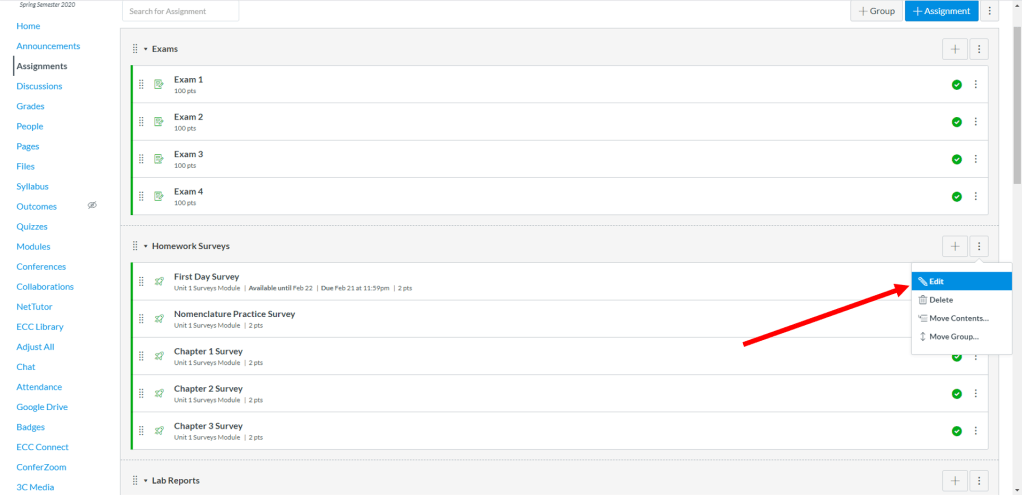
Step 2: Click on the three little dots next to a group you want to drop something in at the top of the section and select Edit
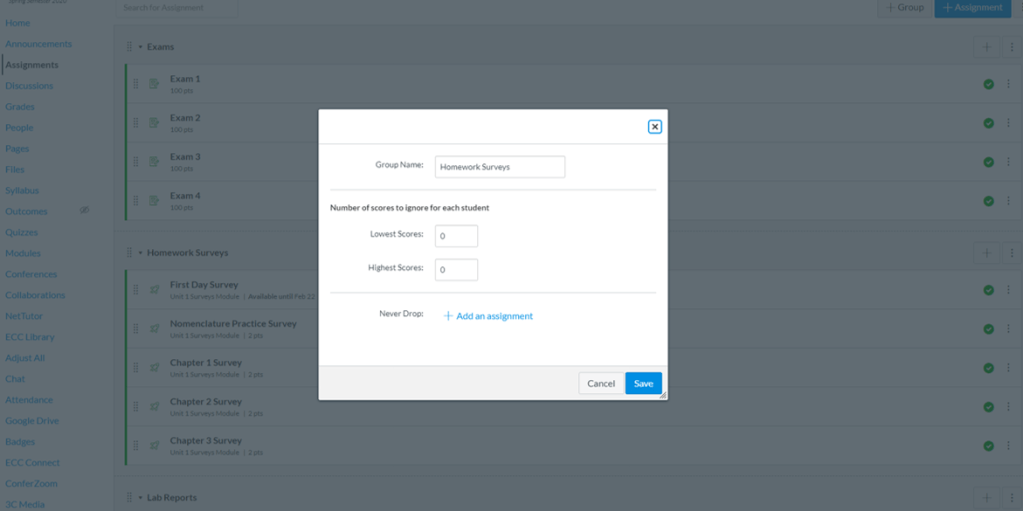
Step 3: You’ll get a window like below. You can select how many assignments you want to drop. Another nifty function is down at the bottom. Let’s say you don’t want them to be able to drop their last assignment (so they have to turn it in even if they are doing really well). You can tell Canvas not to remove specific assignments.
Now. This is a pretty vanilla thing to do. Lot of Canvas users know how to do it. This is just a small taste of things to come (get the cooking references? Eh? Eh????).
 The Canvas Cookbook
Thanks for sharing Shaun! I am looking forward to learning more about Canvas. You teach a complicated subject. Do you ever post videos or lectures to Canvas as a sort of study guide?
LikeLike
Thanks for the instructional pictures. Looking forward to learning how you set up your classroom through Canvas
LikeLike